Proforma for advisory firms
A computing workspace
for advisers.
Bring client evidence, calculations, and review into one workspace. Turn a recurring engagement into tools your team can inspect, update, and use again.
For the work behind the advice
A review your team can pick up again.
Start with the records and process you already use. Build a workflow around one engagement before extending it to others.
Keep the evidence close
Organize permitted client files, source extracts, and calculations around the questions the reviewer needs to answer.
Make the method reusable
Develop calculations and interactive Apps around your firm's approach. Adapt the inputs and assumptions for the next engagement.
Make review explicit
Keep missing support and unresolved questions visible. Your advisers assess the evidence and make the specialist judgments.
One place to start / R&D evidence
From technical records to a review packet.
Inspect a US R&D Evidence Review built in Proforma. It connects business components, technical uncertainty, source records, and documented cost allocations.
This is a static capture of a private example App using fictional records. The US example is not an installable package; adapting it to your practice is scoped work. Session changes must be exported to retain them.
For Australia, the separate R&DTI Evidence package starts empty and supports saved activity revisions and evidence-pack exports. Both workflows require specialist review; neither determines eligibility or lodges claims.
Explore the Australian R&DTI package ↗US R&D Evidence Review
What supports the research work and its cost?
Link technical uncertainty, alternatives, experiment records and expense allocations. See what still needs review before preparing an adviser packet.
2 business components / 5 evidence records / US research credit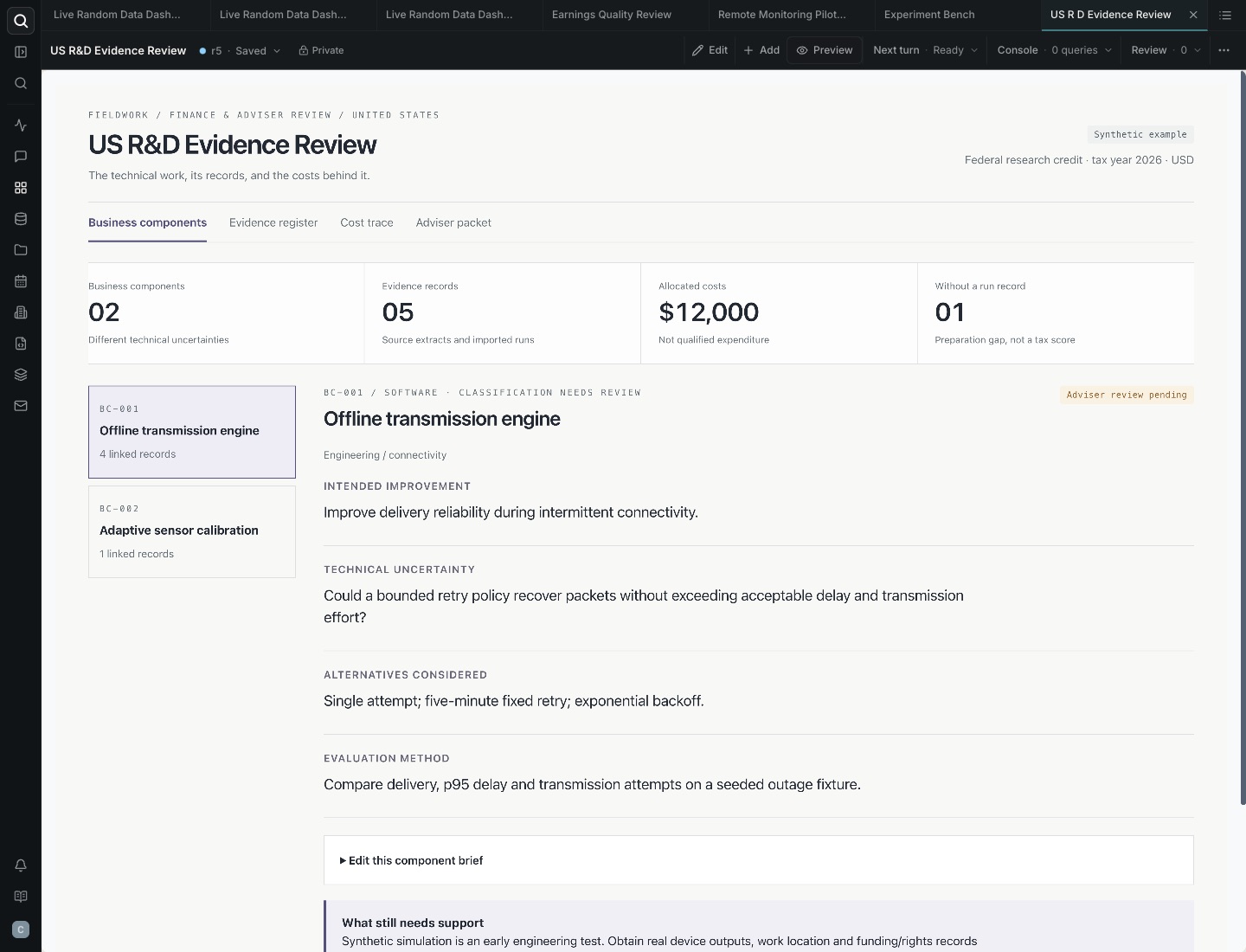
Swipe the capture to inspect it, or open it full size.
- Question
- Which records explain what was uncertain, what was tried, and how the costs relate to the work?
- Method
- Organize source extracts and run records by business component. Trace allocations to their supporting evidence.
- Result
- $12,000 of allocated costs remain subject to review. Missing support stays visible; allocated costs are not automatically qualified expenses.
Work with our team
Start with one recurring workflow.
Bring an existing review process and describe the output your team needs. We can scope the implementation together.
Discuss this workflowAgree the first delivery
Choose one workflow, permitted inputs, the intended App or review output, and a reviewer. Agree scope, fees, responsibilities, and timing before starting.
Review the work together
Check the output against your method and source records. Define what needs to be saved, exported, or handed over, and agree any ongoing support.
Measure the whole engagement
Compare preparation, review, and correction time, including setup effort. Then test whether your team can use the workflow on another engagement.
Before using client records
Agree access and review responsibilities.
Define who may access the records, who reviews the output, and how materials are retained and handed over. Source imports and automations depend on the connections and workflow configured for the engagement.
Discuss your client relationship, method ownership, and delivery responsibilities as part of the scope. Proforma's example outputs do not replace professional sign-off.
Read about access and controls ↗One application of a broader platform
Keep exploring what you can build.
Use the same workspace to investigate a question, compare scenarios, or build an interactive tool for your team.