skip to content

R&D evidence review

From company records to a useful R&D review.

Bring technical and financial records into one scoped engagement. Receive an initial evidence review showing what the records support, what is missing and which questions to answer next.

Begin with uploads. Preparation can be manual. No card, sales call or agent conversation is required to start collecting records.

What you do. What you receive.

A clear path from collection to first value.

Start with one engagement and supply only records you are permitted to share. Collection status and missing inputs remain visible while your initial review is prepared. You can return to the same engagement as the work develops.

  1. 01
    ScopeYou

    One company. One reporting period.

    Create your account, identify the company and record the period and jurisdiction. Save the engagement and return when you are ready to supply records.

  2. 02
    RecordsYou + permitted sources

    Start with what you have.

    Upload project notes, experiment evidence, payroll and expense records. Where enabled, collect selected GitHub, Linear, Jira or GitLab records and capture permitted Notion or Google Drive documents. Save exact evidence versions separately from live collection. Uploads work on their own.

  3. 03
    PreparationAn identified preparer

    Make the support and gaps visible.

    Submit your available records for preparation. A preparer can assemble the initial review manually, linking supported project notes and available cost records to their sources and identifying what still needs an answer.

  4. 04
    ReviewYou + your adviser

    Read a saved review. Choose the next step.

    Open the prepared review in your engagement, inspect its source references and download the saved version. Use its coverage, gaps and next questions to continue the work with your adviser.

The initial review supports preparation; it does not determine tax eligibility or replace an approved annual report. Cost allocation and formal delivery need their own agreed method and responsible reviewer.

Initial R&D evidence reviewIllustrative example · fictional records

Software reliability · January–June

Retrieval reliability

Saved review
Version 1
Explore the sample review
What the records support

An approach is documented.
The outcome needs more support.

The project notes describe comparing keyword and embedding retrieval for ambiguous queries. Final benchmark results have not been supplied.

Technical question
Can the retrieval service return useful evidence when the request is ambiguous?
Source support
Repository change reference and experiment-note revision.
What remains open
The recorded outcome, evaluation method and connection between supplied AI costs and this project.
Selected repository history+ experiment note

This sample explains the format; it is not a customer result or an available allocation feature. Your review uses supplied records and identifies its preparer. An initial review is not a tax eligibility determination or an approved annual report.

The broader platform

The platform behind the review.

Proforma also brings data engineering, AI and experimentation into a programmable workspace. The examples and capabilities below show how teams can investigate, build Apps and run Actions across sales, marketing, operations and technical R&D. They are available separately from the focused customer collection flow.

Examples · synthetic data

Business Experiment Lab

What should we try next—and why?

Investigate conversion and customer quality across sales, marketing and product. Compare a change against its baseline, inspect the tradeoffs, and use the evidence to plan the next test.

3 business questions / inspectable sample results / proposed next tests
Full-size capture
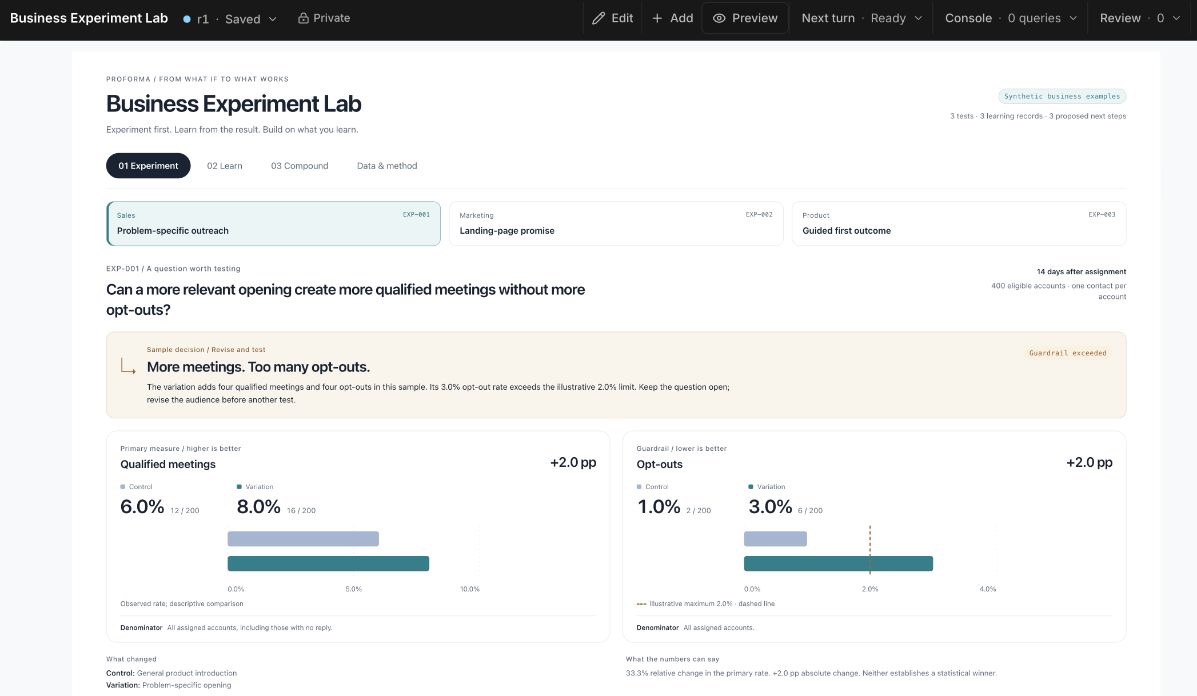
Business Experiment Lab in Proforma: qualified sales meetings improve from 6% to 8%, but the 3% opt-out rate exceeds the 2% sample guardrail.

Swipe the capture to inspect it, or open it full size.

Captured in Proforma / Sales testFictional records. Actual product interface.
Experiment
Does problem-specific sales outreach produce more qualified meetings? Compare 200 accounts per approach, with opt-outs as a guardrail.
Learn
Qualified meetings rise from 6% to 8%, but opt-outs rise to 3%, above the example’s 2% limit. More meetings alone do not justify a rollout.
Compound
Keep the finding and its limits. Proposed follow-up: retain the problem framing, tighten account eligibility, and test again. No follow-up result is claimed.

Broader platform workflows

One way of working. Methods that fit the question.

A sales message, an operating process and a technical design can all improve through investigation and testing. The evidence each needs is different. Start with the job in front of you, then keep what helps the next decision. A direct analysis or automation task does not need a formal experiment.

Sales and marketing

More demand is useful when it is the right demand.

In Business Experiment Lab, a broader landing-page promise produces 102 signups instead of 72, but only 42 qualified leads instead of 48. The larger number hides a weaker business outcome.

Keep the qualification definition and full-visitor denominator. The proposed next test keeps the specific promise and changes the supporting proof.

Technical R&D

Complete delivery is useful when it arrives in time.

In Experiment Bench, fixed retries deliver all 120 packets, but p95 delay is 15 minutes against a 10-minute target. A repeatable simulation makes the trade-off visible.

Keep the fixture and delay target. A proposed follow-up varies the retry interval. Sensor Calibration Study asks a different question: how well does the same fitted method hold up under drift?

Both examples use synthetic records. They illustrate a method and a proposed next step, not a proven business improvement or a completed follow-up. Explore the calibration example.

  1. 01
    InvestigateOutcome + evidence

    Start with what should improve.

    Start in Chat with a question: why are more signups producing fewer qualified leads? Can a retry policy recover packets within the delay target? Inspect the available Data and agree on the outcome and constraints.

  2. 02
    BuildData + method + working App

    Engineer the data and the method.

    Inspect identifiers, missing events, units and freshness. Define joins, qualification rules and conversion denominators in SQL Models. Keep reusable checks and computation in Actions, and build an App around the comparison.

  3. 03
    RunTest + repeatable work

    Try a change at the right scale.

    Use Actions and configured Connections for repeatable work: refresh data, run checks and coordinate tasks on a schedule or event. Inspect the execution and its outputs. Keep the audience or test fixture, changes and review window with the result.

  4. 04
    MeasureOutcomes + constraints

    Read the result with its trade-offs.

    Compare qualified demand with signup volume and customer quality. Compare packet delivery with delay and transmission attempts. Keep denominators, targets and uncertainty visible; a better headline number can still miss the goal.

  5. 05
    ImproveLearning + next decision

    Give the next attempt a better starting point.

    Record what happened, what remains uncertain and what to try next. Keep useful definitions in Context, calculations in Models and repeatable execution in Actions. Reuse and adapt the App as evidence develops.

01

Definitions your team can reuse.

Save the meaning of a qualified lead, a delivery target or an acceptable error in Context. Keep the source evidence in files and Data so the next investigation can inspect the same starting point.

02

Working tools that carry the method.

Keep calculations in SQL Models, interaction in Apps and repeatable execution in Actions. Reuse transformations, quality checks and instrumentation as well as the analysis, with definitions and assumptions available for review.

03

Findings someone can build on.

Retain the evidence, decision and limits of a finding. A colleague or agent can review what you tried, see what remains uncertain and choose the next change without starting from an empty conversation.

The computational engine

Data, computation, and interaction. Together.

Connect the data, define what matters and build the App around the work. Use the same workspace to answer a one-off question, test a change and run the useful routine it becomes.

01 · FoundationDataConnect, ingest and prepare the evidence.

Work with warehouse tables, connected services, documents and spreadsheets. Inspect source schemas and sync history, reconcile records and prepare reusable data for analysis and automation.

Warehouse and catalog

Find the datasets available to you and inspect their structure and descriptions.

Connected data

Query imported data and inspect its provider, schema, and sync history.

Managed connectors

Sync supported services so your analysis can work with updated data.

Files and spreadsheets

Use CSVs, workbooks, and Google Sheets alongside warehouse data and source documents.

Shared data

Make permitted datasets available across workspaces for shared analysis.

02 · UnderstandingAnalysisGive your question a method.

Explore patterns, check assumptions, and write reusable analyses. Inspect the calculation before interpreting what the result means.

Data models

Define reusable transformations and calculations in SQL, then query them throughout the workspace.

Metrics and lineage

Inspect calculation definitions and their data dependencies.

Exploratory analysis

Investigate patterns in revenue, retention, costs, research data, and operations.

Product and web tracking

Collect behavioral events and analyze them beside your other evidence.

Customer data

Combine customer, product, and commercial records to investigate a more complete picture.

03 · ExecutionApps and automationBuild the interface. Orchestrate the work.

Create Apps for inspecting data, comparing results and operating a workflow. Use Actions to refresh data, call connected services and coordinate repeatable work, including configured AI calls for text or structured output.

Apps

Build an interface for exploring results, changing inputs, or reviewing a body of evidence.

Automations

Run saved routines for reports, reconciliations, checks, and alerts on a schedule or event.

Webhooks

Receive external events and use them to trigger a routine.

Agent workspace

Ask a question, work through an analysis with AI, and create files, data models, Apps, and Actions.

Reusable packages

Start with a working application, inspect its setup, and adapt it to your question and data.

Activity and review

Follow task progress, inspect outputs, and respond when your agent needs input.

04 · ReachChannelsBring the rest of your work into view.

Use connected tools to collect context, prepare communications, and carry an investigation into the places your team already works.

Slack

Work with conversation context and bring an analysis into a team discussion.

Email

Prepare and send messages through a connected account with the controls your workflow needs.

Browser operations

Use supervised browser work to investigate or interact with systems beyond a data connection.

Prospecting

Collect company and contact research for market analysis and outreach.

Recordings

Bring recorded demonstrations and reviews into your research material.

Meeting notes

Capture observations, decisions, and open questions from a conversation.

Voice agents

Prepare, simulate, review, and place calls through supported voice connections.

05 · ExtensibilityAgents and developersExtend the way you investigate.

Use APIs and coding agents with scoped workspace access. Connect a specialist executor when an investigation needs work in a repository.

HTTP API

Give external software a scoped path to workspace data and operations.

Agent workspace access

Let a coding agent work with the data and tools in an approved Proforma workspace.

Executor connections

Delegate a defined repository task to a connected coding system and follow its progress and outputs.

Command line

Use workspace data and operations from your project shell.

MCP

Use one native MCP connection to read governed data, install complete packages, build Apps and run approved Actions in the same Workspace.

Configure https://app.proformalabs.ai/mcp as a Streamable HTTP server in your compatible host, then authorize your Workspace in the browser. Use a plugin or a direct registration once; /mcp/analysis remains an alias to the same catalog. Keep execution receipts and follow continuations and readiness before claiming completed work. Scopes and Model policy still govern each operation.

The technical model

Five primitives. One programmable workspace.

Files hold your notes and code. Data lets you discover and query your datasets. These five building blocks turn the workspace into tools you can adapt to your own questions and workflows.

01
Source
Raw, queryable data brought in from another system.
02
Model
A reusable SQL definition that produces a queryable view or table.
03
App
An interactive React project with its own files, routes, and revision history.
04
Action
Versioned code for analysis, automation, integrations, and orchestration.
05
Chat
An agent conversation that can investigate and create durable work.

Start with your R&D evidence

Bring the records. Find the next questions.

Create a scoped engagement for your company, supply the records you have and return to a prepared initial review. Discuss follow-up and commercial arrangements separately through the advisor email.