skip to content

Developers

Build apps with the tools you already use.

Connect your preferred agent to the data, files, and context behind your app. Use it to build analyses, apps, and automations in one approved workspace, or delegate a bounded repository task to a connected coding executor.

React Apps

SQL Models

TypeScript Actions

Scoped agent access. Inspectable files.

The two-way model

Agents move in both directions.

These are different grants with different owners. Workspace access lets an agent use Proforma. An executor connection lets Proforma assign repository work. Neither path silently grants production authority.

InboundAgent → Proforma

Give an agent the context and tools it needs.

An HTTP client, editor agent, terminal, or MCP host receives one approved workspace and the smallest useful scopes. Its durable output becomes normal Proforma work.

  1. 01.01

    Discover the live contract before requesting access.

  2. 01.02

    Let a person choose the workspace and approve exact scopes in the browser.

  3. 01.03

    Read data and context; create normal Files, Apps, and other approved work.

  4. 01.04

    Return durable receipts and links the team can inspect.

Available over HTTP, CLI, and browser-authorized workspace connections.
OutboundProforma → coding executor

Give a specialist system a bounded implementation task.

Proforma keeps the outcome, acceptance criteria, repository scope, policy, status, and evidence while a connected executor implements the change.

  1. 02.01

    Define the assignment, acceptance criteria, and review policy.

  2. 02.02

    Click Connect Cursor, review the repository allowlist, and sign in through the browser—no API key to copy.

  3. 02.03

    Follow normalized progress, usage, branch, and pull-request evidence with the assignment.

  4. 02.04

    Keep merge and deployment under human review, repository CI, and release policy.

Cursor Cloud is available now. Codex, OpenCode, and private runners fit the same boundary as their connections ship.

Proforma keeps the requirements. The executor owns only its bounded assignment.

The Connection owns eligibility. Repository allowlists determine where an executor may work.

The repository owns release. CI, review, merge, and deployment remain separate authority.

HTTP onboarding

From first request to approved workspace.

No SDK or CLI is required. The raw device flow gives an HTTP-capable agent a short-lived way to request access while authentication and approval stay with the person in the browser.

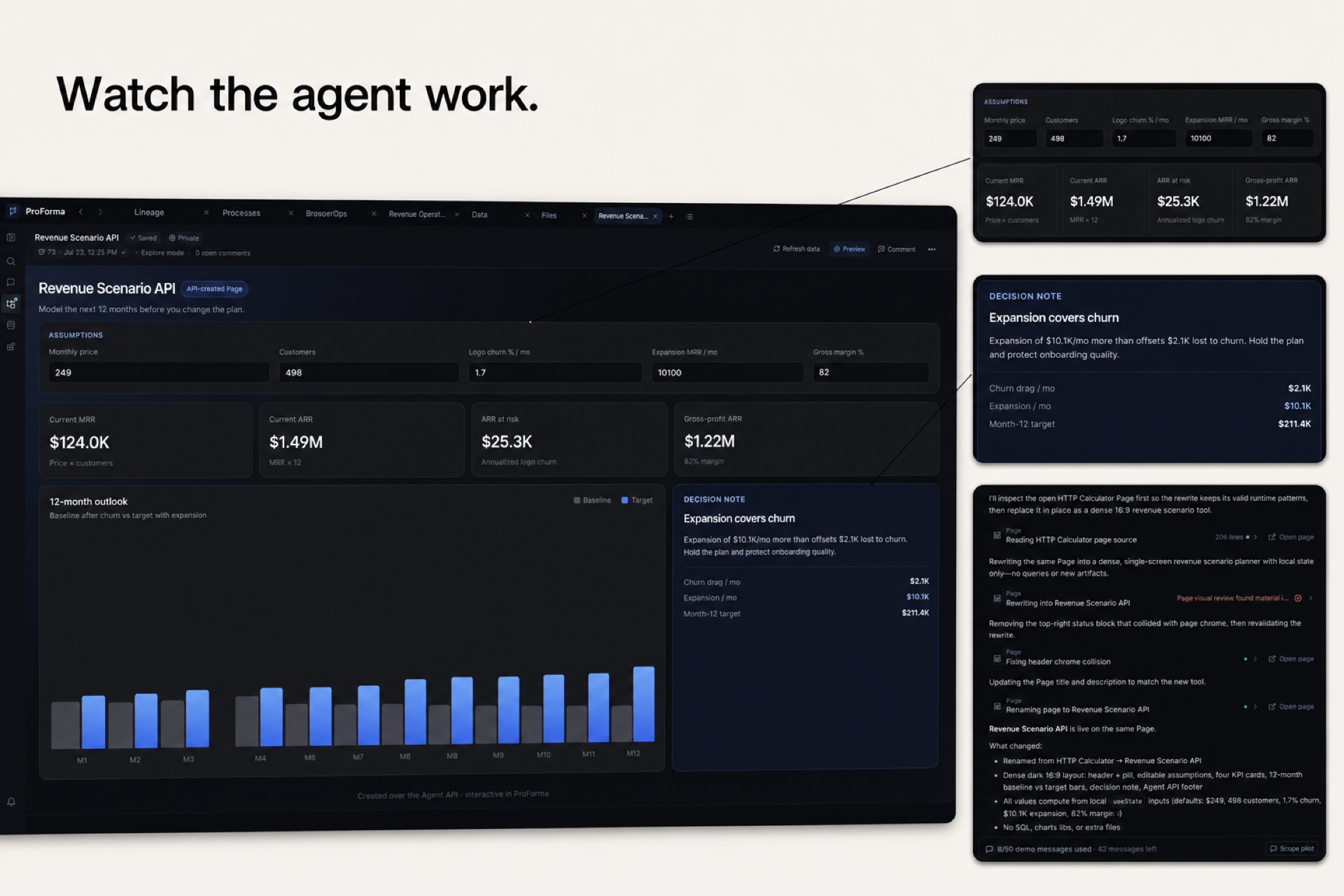
A sample Proforma revenue scenario App with close-up callouts for assumptions, decision logic, and the agent revision trail
Sample workspace · an external agent creates normal Apps while its assumptions, revisions, and review trail remain visible.
  1. 01

    GET/v1

    Discover the live surface.

    Read the routes, limits, and capabilities currently mounted before the client asks to connect.

  2. 02

    POST/v1/auth/device

    Request a short-lived connection.

    The response gives the agent a safe verification URL and matching code. Its secret device code stays out of prompts and logs.

  3. 03

    HUMANbrowser approval

    Choose the workspace and access.

    A person compares the code, selects one workspace, and reviews the requested access and exact scopes in the browser.

  4. 04

    POST/v1/auth/token

    Exchange once, in private.

    Poll no faster than the advertised cadence. The successful response returns the bearer token once, directly to protected storage.

  5. 05

    GET/v1/session

    Confirm the effective grant.

    Read the workspace, expiry, scopes, Model access policy, and available operations before the agent begins work.

Access

Ask for only what the job needs.

Browser authorization shows the exact scopes before approval. Delegated Proforma Chat is separate from all three browser-authorized modes.

01
Explore
prfm login --access explore

Read workspace files, context, Apps, Actions, catalog metadata, and bounded queries over approved materialized Models.

02
Build
prfm login --access build

Add direct File and App revisions and Data-definition authoring when the task needs to create durable work.

03
Operate
prfm login --access operate

Add connection management, Action runs, automations, and Tracking operations only when the task needs an external effect.

Interfaces

Use the interface your agent already has.

Every interface reaches the same approved workspace. Choose the one that fits the host, then keep the durable result in Proforma where people and agents can review it.

  1. 01

    HTTP API

    Use live discovery and a scoped session from any client that can make HTTPS requests.

    Explore HTTP API
  2. 02

    prfm CLI

    Load context, inspect data, and work with workspace files from the shell an agent already has.

    Explore prfm CLI
  3. 03

    Agent workspace access

    Connect Codex, Claude Code, Cursor, or another shell-based agent to one approved workspace.

    Explore Agent workspace access
  4. 04

    Executor connections

    Delegate bounded repository work to Cursor while Proforma retains the question, requirements, and evidence.

    Explore Executor connections
  5. 05

    MCP

    Expose approved workspace context through an editor or agent host that supports MCP.

    Explore MCP
  6. 06

    Tracking SDK

    Send browser and server events into Proforma to study product behavior and evaluate changes.

    Explore Tracking SDK

Command line

Start from the shell.

Begin with read access. Ask for build or operate access only when the task needs to create work or run an approved action.

pnpm add --global @prfm/cli
prfm login --access explore
prfm whoami
prfm context "Review customer churn"

Live reference

Give people and agents the same map.

Discovery reports the contract currently deployed. Read the session before doing work so the client knows which workspace and access it actually received.